Triển khai HTTPS cho S3 với ACM và CloudFront
SonetOps
•
22/09/2025
Siêu tốc triển khai HTTPS cho S3 với ACM và CloudFront
Bạn muốn website S3 của mình nhanh, an toàn với HTTPS? Hướng dẫn này giúp bạn triển khai ACM Certificate và CloudFront cho subdomain blogs.sonetops.tech trong tích tắc, tối ưu quy trình DevOps!
Tại sao cần ACM và CloudFront?
ACM cung cấp certificate miễn phí cho HTTPS, CloudFront tăng tốc phân phối nội dung S3, đảm bảo bảo mật và hiệu suất. Cả hai kết hợp mang lại trải nghiệm người dùng đỉnh cao.
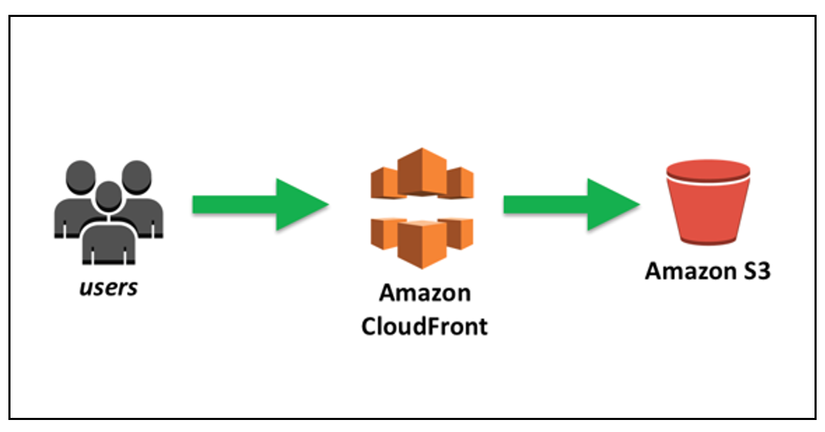
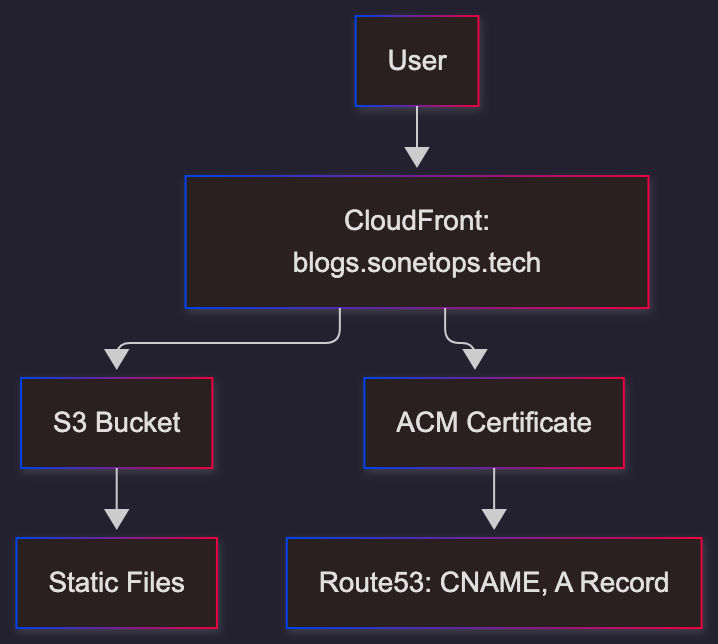
Hình 1: Kiến trúc CloudFront phân phối S3
Hướng dẫn triển khai
Giả định: S3 bucket bật static website hosting, public read.
- Tạo ACM Certificate (us-east-1):
- ACM Console > Request public certificate > Domain:
blogs.sonetops.tech> DNS validation. - Copy CNAME:
_xxxx.blogs.sonetops.techtrỏ_xxxx.acm-validations.aws.
- ACM Console > Request public certificate > Domain:
- Thêm CNAME vào Route53:
_xxxx.blogs.sonetops.tech CNAME _xxxx.acm-validations.aws - Tạo CloudFront:
- Origin: S3 website endpoint (e.g.,
your-bucket.s3-website-region.amazonaws.com). - Viewer protocol: Redirect HTTP to HTTPS.
- Alternate domain:
blogs.sonetops.tech, chọn ACM cert. - Default root:
index.html.
- Origin: S3 website endpoint (e.g.,
- Cập nhật Route53:
- A record:
blogs.sonetops.tech> Alias to CloudFront (dxxxx.cloudfront.net).
- A record:
Sơ đồ luồng triển khai
Kiểm tra và xử lý lỗi
- Test: Truy cập
https://blogs.sonetops.tech, check cert Amazon. - Lỗi 403: Đảm bảo S3 policy public read:
{ "Version": "2012-10-17", "Statement": [ { "Sid": "PublicReadGetObject", "Effect": "Allow", "Principal": "*", "Action": "s3:GetObject", "Resource": "arn:aws:s3:::your-bucket-name/*" } ] } - Pending validation: Kiểm tra CNAME đúng.
Kết luận
Với ACM và CloudFront, website S3 của bạn trên blogs.sonetops.tech sẽ nhanh, an toàn, và tối ưu! Triển khai ngay và khám phá thêm tại AWS Docs.